Nginx 基础
Nginx七大核心应用场景:反向代理、虚拟主机、域名解析、负载均衡、防盗链、url重定向、https。
常见版本如下:
> **[Nginx 开源官网](https://nginx.org/en/)**
> 点击跳转官网查看详细内容 > **[Nginx 官方商业版本(F5)](https://nginx.com/)** > 点击跳转官网查看详细内容 > **[OpenResty 开源官网](https://openresty.com.cn/cn/)** > 点击跳转官网查看详细内容 > **[Tengine 开源官网](http://tengine.taobao.org)** > 点击跳转官网查看详细内容## 快速开始
1. 这里拿 Nginx 官方开源版作为示例,首先你得需要一台 Linux 机器并下载 Nginx 二进制包。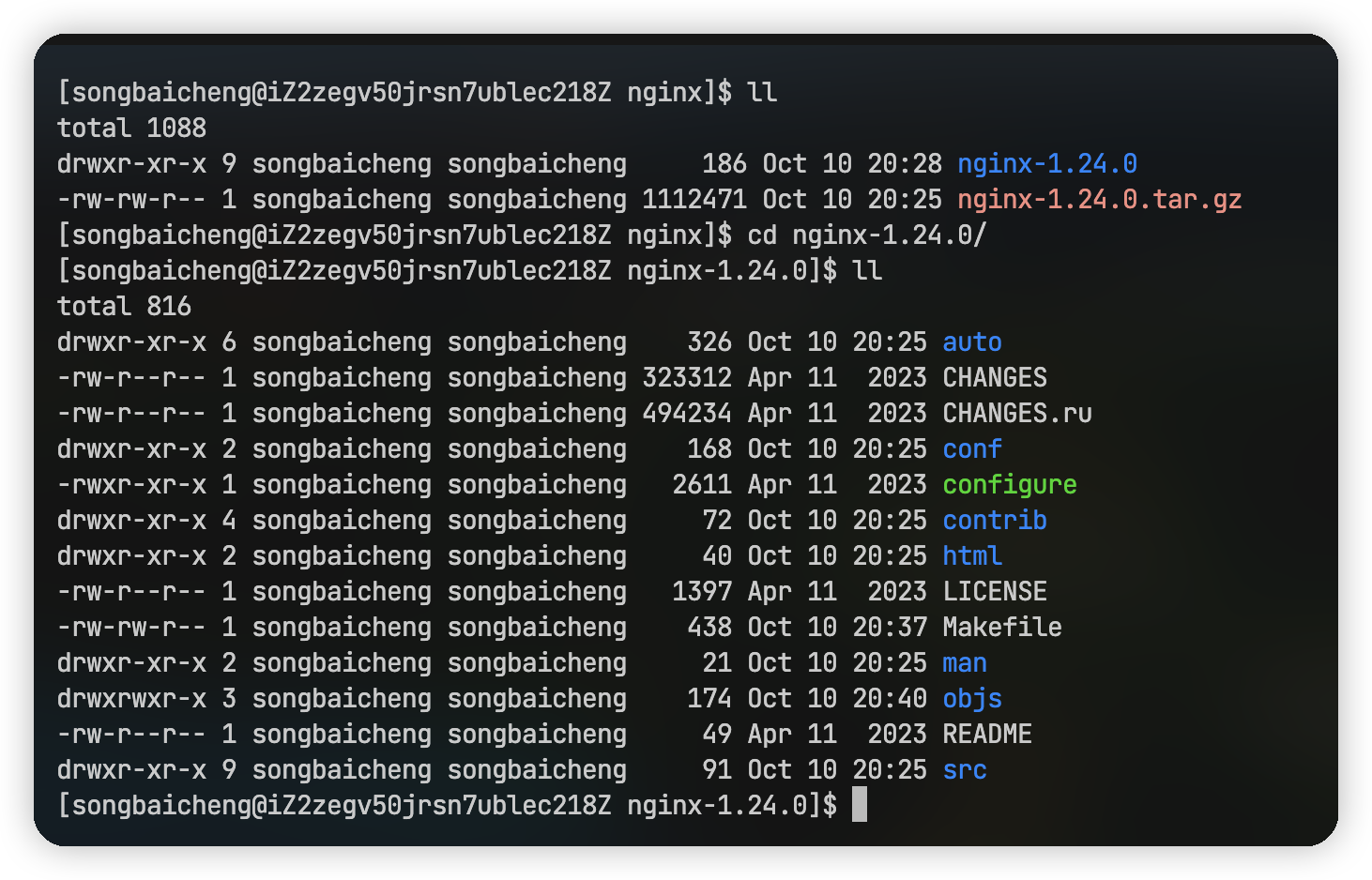
- 使用
./configure --prefix=/usr/local/nginx执行configure可执行文件,如果需要gcc依赖请先下载,如果执行期间有其他缺少的依赖补充后重新执行脚本即可。 - 配置完成后依次执行
make和make install开始安装,注意可能需要 root 权限。 - 安装完成后就可以在 /usr/local/nginx 目录下看到我们安装的 Nginx 目录了,可以执行 /sbin 目录下的 nginx 脚本进行启动 nginx 服务,访问 linux 主机 ip 看是否能够启动成功,可以通过
./nginx -s stop关闭 Nginx。
优雅起停 Nginx
首先我们要先知道几个常见的起停 Nginx 的命令:
# 启动 Nginx
./nginx

# 快速暴力停止 Nginx
./nginx -s stop

# 优雅停止 Nginx
./nginx -s quit

# 重新加载配置
./nginx -s reload
而平时我们真正生产上使用服务器启动和关闭 Nginx 不会总是每次都找到此执行文件执行的,所以我们需要把起停命令添加到 systemctl 来方便我们直接起停,我们可以在 /usr/lib/systemd/system 目录下添加 nginx.service 这个文件,内容如下:
[Unit]
Description=nginx
After=network.target remote-fs.target nss-lookup.target

[Service]
Type=forking
PIDFile=/usr/local/nginx/logs/nginx.pid
ExecStartPre=/usr/local/nginx/sbin/nginx -t -c /usr/local/nginx/conf/nginx.conf
ExecStart=/usr/local/nginx/sbin/nginx -c /usr/local/nginx/conf/nginx.conf
ExecReload=/usr/local/nginx/sbin/nginx -s reload
ExecStop=/usr/local/nginx/sbin/nginx -s stop
ExecQuit=/usr/local/nginx/sbin/nginx -s quit
PrivateTmp=true

[Install]
WantedBy=multi-user.target
创建完成之后执行 systemctl daemon-reload 加载一下添加的配置,现在我们就可以使用 systemctl 来控制 Nginx 的起停了。
# 启动 Nginx
systemctl start nginx.service

# 查看 Nginx 状态
systemctl status nginx.service

# 停止 Nginx
systemctl stop nginx.service

# 设为开机启动
systemctl enable nginx.service

# 关闭开机启动
systemctl disable nginx.service
认识目录
- nginx
    - conf # 配置目录
    - html # 静态资源和界面
    - logs # 日志
    - sbin # 主进程文件
工作模式
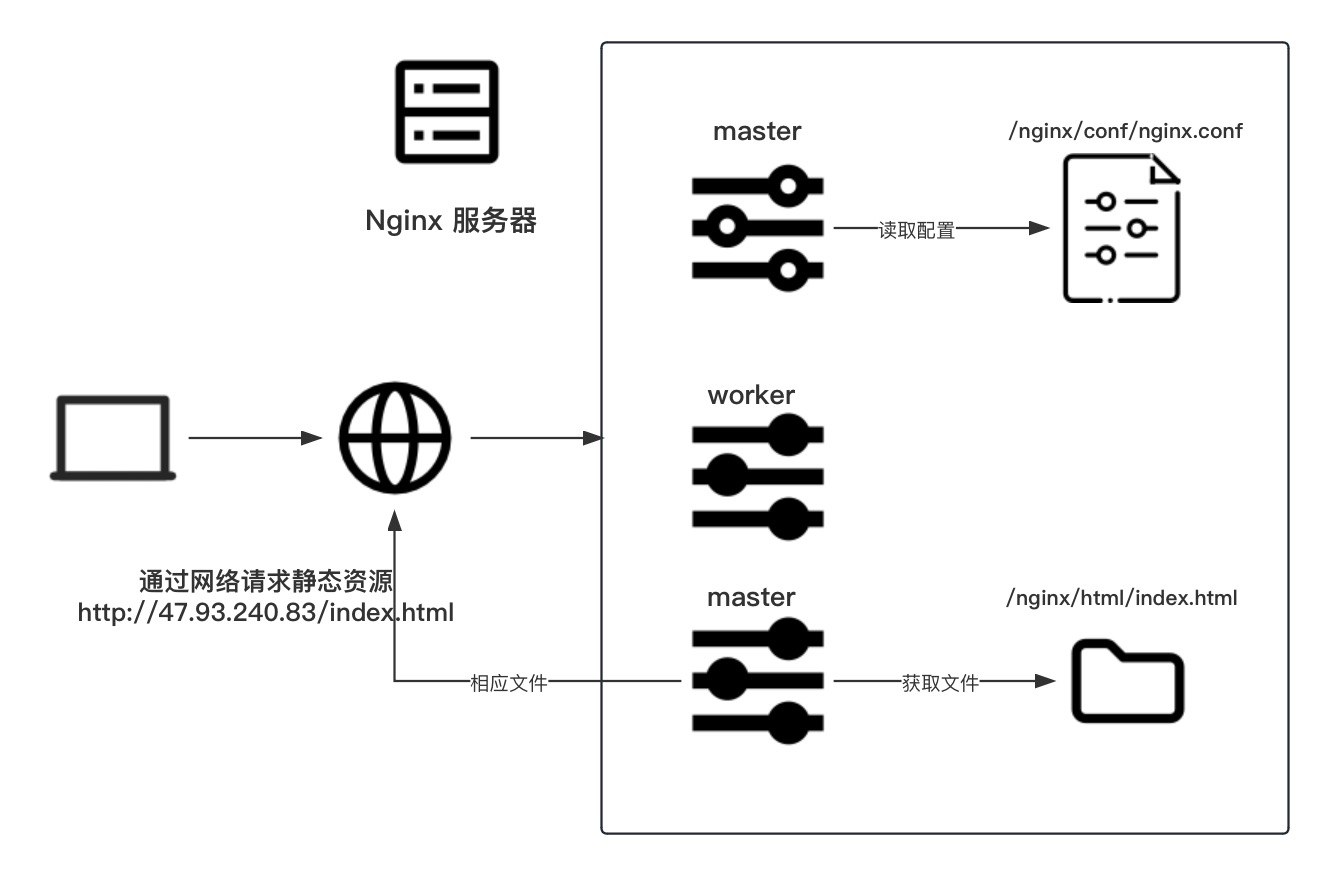
Nginx在启动的时候会采用多进程的方式,产生 master 和 worker 两种进程进行工作,master 负责统一协调 worker 进程的工作调度,而真正工作的都是一个个的 worker 进程。
配置文件详解
nginx.conf
```bash #user nobody; worker_processes 1; # 工作进程个数#error_log logs/error.log; #error_log logs/error.log notice; #error_log logs/error.log info;
#pid logs/nginx.pid;
events { worker_connections 1024; }
http { include mime.types; # 引用其他的配置文件,这里的mime是告知浏览器请求文件类型解析方式的配置 default_type application/octet-stream; # 默认文件通过流的方式处理
#log_format  main  '$remote_addr - $remote_user [$time_local] "$request" '
#                  '$status $body_bytes_sent "$http_referer" '
#                  '"$http_user_agent" "$http_x_forwarded_for"';

#access_log  logs/access.log  main;

sendfile        on; # 文件零拷贝
#tcp_nopush     on;

#keepalive_timeout  0;
keepalive_timeout  65; # 长链接时长

#gzip  on;

server { # 一个虚拟主机配置
    listen       80; # 端口
    server_name  localhost; # 可解析的域名、主机名

    #charset koi8-r;

    #access_log  logs/host.access.log  main;

    location / {
        root   html; # 资源访问地址
        index  index.html index.htm; # 默认页
    }

    #error_page  404              /404.html;

    # redirect server error pages to the static page /50x.html
    #
    error_page   500 502 503 504  /50x.html; # 服务器错误跳转界面
    location = /50x.html {
        root   html;
    }

    # proxy the PHP scripts to Apache listening on 127.0.0.1:80
    #
    #location ~ \.php$ {
    #    proxy_pass   http://127.0.0.1;
    #}

    # pass the PHP scripts to FastCGI server listening on 127.0.0.1:9000
    #
    #location ~ \.php$ {
    #    root           html;
    #    fastcgi_pass   127.0.0.1:9000;
    #    fastcgi_index  index.php;
    #    fastcgi_param  SCRIPT_FILENAME  /scripts$fastcgi_script_name;
    #    include        fastcgi_params;
    #}

    # deny access to .htaccess files, if Apache's document root
    # concurs with nginx's one
    #
    #location ~ /\.ht {
    #    deny  all;
    #}
}


# another virtual host using mix of IP-, name-, and port-based configuration
#
#server {
#    listen       8000;
#    listen       somename:8080;
#    server_name  somename  alias  another.alias;

#    location / {
#        root   html;
#        index  index.html index.htm;
#    }
#}


# HTTPS server
#
#server {
#    listen       443 ssl;
#    server_name  localhost;

#    ssl_certificate      cert.pem;
#    ssl_certificate_key  cert.key;

#    ssl_session_cache    shared:SSL:1m;
#    ssl_session_timeout  5m;

#    ssl_ciphers  HIGH:!aNULL:!MD5;
#    ssl_prefer_server_ciphers  on;

#    location / {
#        root   html;
#        index  index.html index.htm;
#    }
#}
}
<details>
<summary>## 自定义虚拟主机域名</summary>
在我们简单了解了 nginx.conf 文件后,我们可以看到其中每个 http 下的 server 就是一个虚拟主机,这里我们模拟一个新的虚拟主机通过不同端口访问不同的资源。

<details>
<summary>通过端口自定义虚拟主机</summary>
```bash
server {
        listen       88; # 端口
        server_name  localhost; # 可解析的域名、主机名

        location / {
            root   my-html; # 资源访问地址
            index  index.html index.htm; # 默认页
        }

        error_page   500 502 503 504  /50x.html; # 服务器错误跳转界面
        location = /50x.html {
            root   html;
        }
    }
一样的,如果我们想通过不同的域名访问不同的资源,我们可以修改 server_name 来区分资源路径。
通过域名自定义虚拟主机
```bash server { listen 80; # 端口 server_name www.XXX.com; # 可解析的域名、主机名 location / {
root my-html; # 资源访问地址
index index.html index.htm; # 默认页
}
error_page 500 502 503 504 /50x.html; # 服务器错误跳转界面
location = /50x.html {
root html;
}
}<details>
<summary>### 虚拟主机域名匹配规则</summary>
- 完整匹配,如果配置的是完整的域名,则按照完整的域名进行匹配,如果配置了多个,则按照从上到下的优先级来决定。server_name 配置项后可以跟多个域名,用空格隔开区分。
- 通配符匹配,可以通过*来匹配域名。
- 正则匹配,一般用于二级域名来使用,通过正则表达式来匹配域名。
## 反向代理
反向代理不是什么高不可攀的东西,如果想理解反向代理我们必须结合正向代理一起理解,一句话来说就是站在用户角度对后台服务器是否可见,如果是正向代理,就好像我们科学上网,配置一台代理服务器访问海外的服务器,我们是知道海外服务器ip地址的,这就是正向,同理,Nginx 作为网关入口,往往是和内网的后台服务器配合,用户访问 Nginx 看不到真实的后台服务器,所以 Nginx 的代理实现是反向的。
Nginx 作为反向代理服务器的时候,设计往往是隧道式的,即所有的请求都必须从 Nginx 进入,这就是所谓的隧道式的含义,而如果是一些下载的请求,返回的数据和进入的请求竞争带宽则非常影响性能,所以就有了更高性能的 lvs 来做负载均衡,或者是内网后台服务器只允许进入走 Nginx 代理,而发送则接入外围网管直接和请求方通讯这种方式。
而我们开启代理非常简单,只需要我们在 server 中 location 下编辑 proxy_pass 即可实现代理跳转。
<details>
<summary>代理服务器配置</summary>
```bash
server {
listen 88; # 端口
server_name localhost; # 可解析的域名、主机名
location / {
proxy_pass http://www.baidu.com; # 代理服务器
# root /usr/local/nginx/my-html; # 资源访问地址
# index index.html index.htm; # 默认页
}
error_page 500 502 503 504 /50x.html; # 服务器错误跳转界面
location = /50x.html {
root html;
}
}## 负载均衡
### 轮训 首先我们需要使用 upstream 配置一个代理集,然后通过 proxy_pass 指定这个代理集,之后我们每次请求这个 server 就会自动轮流执行这个代理集中的地址。简单的轮训负载均衡
```bash upstream webs { server localhost:88; server localhost:89; }server { listen 80; server_name localhost;
location / {
proxy_pass   http://webs;
}

error_page   500 502 503 504  /50x.html;
location = /50x.html {
    root   html;
}
}
server { listen 88; # 端口 server_name localhost; # 可解析的域名、主机名
location / {
proxy_pass   http://www.baidu.com; # 代理服务器
}

error_page   500 502 503 504  /50x.html; # 服务器错误跳转界面
location = /50x.html {
    root   html;
}
} server { listen 89; # 端口 server_name localhost; # 可解析的域名、主机名
location / {
    proxy_pass   http://www.taobao.com; # 代理服务器
}

error_page   500 502 503 504  /50x.html; # 服务器错误跳转界面
location = /50x.html {
    root   html;
}
}
<details>
<summary>### 权重</summary>
权重就是增加每台机器想访问概率的比重,在轮训的基础上配置每个代理服务的 wight 值即可,比如说下面的例子,权重之比是 4:1,那么命中 88 端口的概率就是 80%。

<details>
<summary>简单的权重负载均衡</summary>
```bash
upstream webs {
	server localhost:88 weight=4;
	server localhost:89 weight=1;
    }

server {
    listen       80;
    server_name  localhost;

    location / {
    proxy_pass   http://webs;
    }

    error_page   500 502 503 504  /50x.html;
    location = /50x.html {
        root   html;
    }
}

server {
    listen       88; # 端口
    server_name  localhost; # 可解析的域名、主机名

    location / {
    proxy_pass   http://www.baidu.com; # 代理服务器
    }

    error_page   500 502 503 504  /50x.html; # 服务器错误跳转界面
    location = /50x.html {
        root   html;
    }
}
server {
    listen       89; # 端口
    server_name  localhost; # 可解析的域名、主机名

    location / {
        proxy_pass   http://www.taobao.com; # 代理服务器
    }

    error_page   500 502 503 504  /50x.html; # 服务器错误跳转界面
    location = /50x.html {
        root   html;
    }
}
当然在除了 weight 这个配置之外,每一个 server 后还可以追加一些状态,像备用服务的 backup 和 下线状态 down,虽然这些状态并不常用,因为如果出现了正常服务器失效的时候,备用服务器应该也有可能是失败的,并且修改状态后还需要 reload,也是十分不方便的。
### ip_hash(不常用) 根据客户端的 ip 转发相同的服务器。least_hash(不常用)
最少连接数访问。
url_hash(不常用)
根据 url 定向访问。
fair(不常用)
根据后端服务器响应时间请求转发。
动静分离
一般动静分离都用在中小型网站,因为如果是像淘宝这种静态文件非常多的项目如果放在 Nginx 会占据大量带宽。动静分离的目的就是减轻后台服务器的压力,把一些静态的图片、样式都放在 Nginx 上,同时可以减轻网络的开销。
简单的动静分离配置
```bash upstream webs { server localhost:88 weight=4; server localhost:89 weight=1; }server { listen 80; server_name localhost;
location / {
proxy_pass   http://webs;
}

location ~*/(js|img|css) {
proxy_pass   http://webs;
}

error_page   500 502 503 504  /50x.html;
location = /50x.html {
    root   html;
}
}
<details>
<summary>## URL Rewrite</summary>
这功能是为了掩饰访问后台服务器真正的 url,先看下面的例子。

<details>
<summary>简单的 rewrite 配置</summary>
```bash
upstream webs {
	server localhost:88 weight=4;
	server localhost:89 weight=1;
    }

server {
    listen       80;
    server_name  localhost;

    location / {
    proxy_pass   http://webs;
    rewrite ^/([0-9]+).html$ /index.jsp?pageNum=$1 break;
    }
}
上面配置的含义就是我们将 /index.jsp?pageNum=2 这种实际的 URL 后缀代替成了 /2.html 来访问,其中 rewrite 后面的的三个部分分别是正则、代替的内容和flag标记,其中 flag 标记部分有很多种:
- last:匹配多次正则,一直到最新的匹配结果。 - break:匹配后立即终止返回结果。 - redirect:返回302临时重定向,浏览器会显示跳转后的URL地址。 - permanent:返回301永久重定向,浏览器会显示跳转后的URL地址。防盗链
Nginx 实现防盗链需要配置 valid_referers,来校验请求头中是否携带 Referer 和其对应的网址是否正确。
简单的防盗链配置
```bash upstream webs { server localhost:88 weight=4; server localhost:89 weight=1; }server { listen 80; server_name localhost;
location / {
proxy_pass   http://webs;
rewrite ^/([0-9]+).html$ /index.jsp?pageNum=$1 break;
valid_referers localhost;
if ($invalid_referer) {
    return 403;
}
}
}
<details>
<summary>## 高可用配置(HA)</summary>
区别于一些集群,Nginx 的高可用是基于硬件的一种模拟集群,需要借助 keepalived 实现 ip 漂移来实现一个模拟 ip 访问两个 Nginx 对象服务器。

## 扩容
扩容的方式有很多,有基于硬件资源增加的单机垂直扩容、集群化的水平扩容、细粒度拆分的分布式扩容,当然也可以从服务上进行数据异构化或者服务异步化。

#### ip_hash
即根据访问请求的来源确定一个哈希值,这个请求以后只能请求到一台固定的地址。实现 ip_hash 是在 upstream 中增加一行声明即可实现。

<details>
<summary>简单的轮训负载均衡</summary>
```bash
upstream webs {
    ip_hash;
	server localhost:88;
	server localhost:89;
    }

server {
    listen       80;
    server_name  localhost;

    location / {
    proxy_pass   http://webs;
    }

    error_page   500 502 503 504  /50x.html;
    location = /50x.html {
        root   html;
    }
}

server {
    listen       88; # 端口
    server_name  localhost; # 可解析的域名、主机名

    location / {
    proxy_pass   http://www.baidu.com; # 代理服务器
    }

    error_page   500 502 503 504  /50x.html; # 服务器错误跳转界面
    location = /50x.html {
        root   html;
    }
}
server {
    listen       89; # 端口
    server_name  localhost; # 可解析的域名、主机名

    location / {
        proxy_pass   http://www.taobao.com; # 代理服务器
    }

    error_page   500 502 503 504  /50x.html; # 服务器错误跳转界面
    location = /50x.html {
        root   html;
    }
}