TypeScript + ES6+
前言
TypeScript 与 JavaScript 有着不同寻常的关系。TypeScript 提供了 JavaScript 的所有功能,并在这些功能之上添加了一层:TypeScript 的类型系统,所以很多人都说 TS 是 JS 的超集。更多的细节详见官网,话不多说,我们直接开始准备工作。
所有的测试代码都在博客首页中的 typescript-study-demo 中找到。
TypeScript 官网 点击跳转官网查看详细内容
安装 TypeScript
npm i typescript -g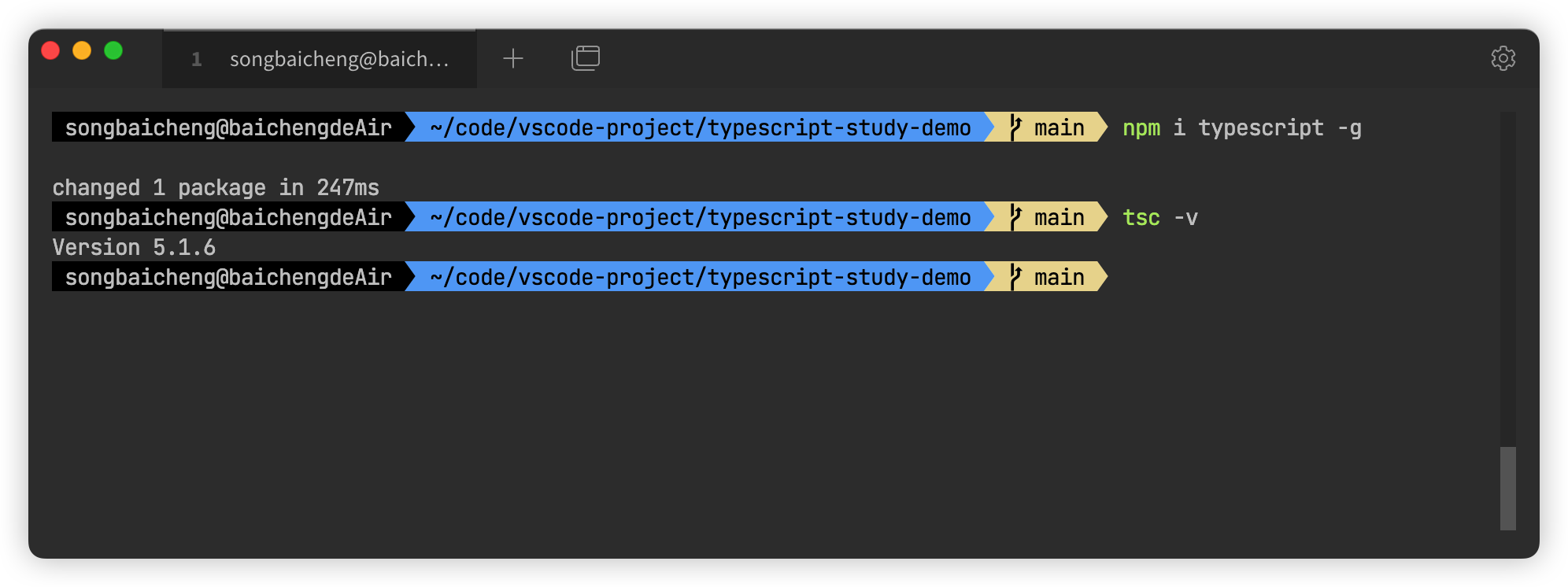
编译 TS 文件
练习开始之前,我们要知道浏览器是不认识ts文件的,这里我们有两种方式查看:
-
比较原始的方式,我们在用ts文件保存之后,先在项目路径下执行
tsc --init,然后使用tsc -w将打开一个 ts 文件编译成浏览器可读的 js 文件的监视器,然后在这个监视器启动的情况下就能把文件中的 ts 文件实时的转化成 js 文件,这样就可以用node [file.js]查看自己写的结果了。 -
个人比较推荐的一种方式,首先先全局安装 ts-node 这个包,然后在项目中再增加 @types/node,现在我们就可以直接使用
ts-node [file.ts]查看结果了。
npm i ts-node -g

npm i @types/node -D
命名空间
TS 为了防止全局变量的污染,默认包含 import 或 export 的文件当做一个模块,如果不添加这两个关键字,则内容会视为全局可见,会造成一些命名的冲突,所以 TS 通过命名空间的方式可以将变量包裹成一个对象来应对这种冲突,但是日常开发还是推荐使用 ES6 的模块化的写法,不推荐使用命名空间。
基本类型
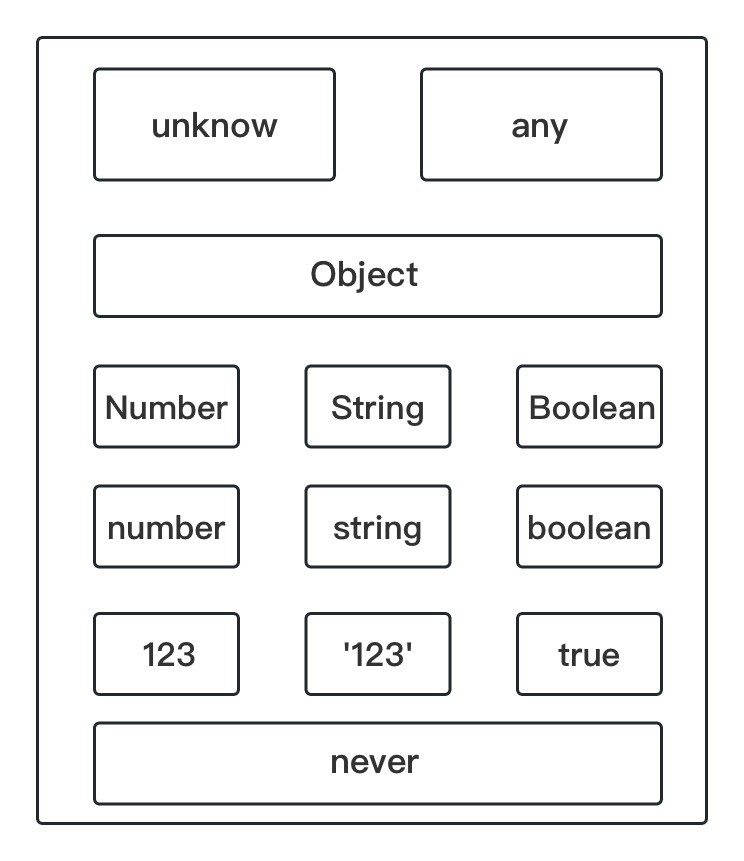
在说基本类型之前想说一下类型推论这个概念,虽然ts在js的基础上创建了很多类型,但并不需要每次声明都携带类型,ts可以自动根据你的初始变量推断出你声明的类型,在之后如果赋值错误类型会提示类型错误,如果未指定初始化变量则ts默认推断为any类型。当然类型也是有等级的,高级的类型包含低级的类型:
数字类型
双精度 64 位浮点值。它可以用来表示整数和分数。
let notANumber: number = NaN; // Nan
let num: number = 123; // 普通数字
let infinityNumber: number = Infinity; // 无穷大
let decimal: number = 6; // 十进制
let hex: number = 0xf00d; // 十六进制
let binary: number = 0b1010; // 二进制
let octal: number = 0o744; // 八进制
字符类型
一个字符系列,使用单引号(‘)或双引号(“)来表示字符串类型。单引号(‘)可以内嵌表达式,反引号(`)来定义多行文本和内嵌表达式。
let str: string = 'songbaicheng'
let str1: string = `i
am
${str}`

console.log(str) // songbaicheng
console.log(str1)
/**
 * i
 * am
 * songbaicheng
 */
布尔类型
表示逻辑值:true 和 false。
let booleand1: boolean = true
let booleand2: boolean = Boolean(1)

console.log(booleand1) // true
console.log(booleand2) // true
数组类型
数组中如果是any类型的可以用元组来代替。
// 在元素类型后面加上[]
let arr: number[] = [1, 2];
// 或者使用数组泛型
let arr1: Array<number> = [1, 2];

console.log(arr) // [ 1, 2 ]
console.log(arr1) // [ 1, 2 ]

// 多维数组
let arr2: number[][] = [[1], [2]]
元组
元组类型用来表示已知元素数量和类型的数组,各元素的类型不必相同,对应位置的类型需要相同。
let x: [string, number];
x = ['songbaicheng', 1];

console.log(x[0]) // songbaicheng
console.log(x[1]) // 1
枚举
枚举类型用于定义数值集合。
enum Color {Red, Green, Blue};
let c: Color = Color.Blue;

console.log(Color.Blue) // 2
console.log(c) // 2
console.log(Color[Color.Blue]) // Blue
void
用于标识方法返回值的类型,表示该方法没有返回值。
function voidFn(): void {
    console.log('test void')
}
null
表示对象值缺失。
let n: null = null;undefined
用于初始化变量为一个未定义的值。
let u: undefined = undefined;never
never 是其它类型(包括 null 和 undefined)的子类型,代表从不会出现的值。
any & unknown
不明确的变量使用的一种数据类型。unknown更安全。
let arrayList: any[] = [1, false, 'fine'];
arrayList[1] = 100;

console.log(arrayList) // [ 1, 100, 'fine' ]
Object & object & {}
Object是一切对象的父类,object是所有的引用类型,而{}相当于 new Object的效果
let o:Object = 123
let o1:Object = '123'
let o2:Object = []
let o3:Object = {}
let o4:Object = () => 123

let o5: object = {}

let n: {} = {}
接口 interface
规定类型的属性模版。
// 对象的接口
interface father {
    a: string
}

interface people extends father {
    name: string
    age: number
    occupation?: string
    [props: string]: any // 其他参数不做硬性需要
}

interface people {
    tel: number
}

let p1: people = {
    name: 'songbaicheng',
    age: 23,
    tel: 123456789,
    occupation: '',
    local: 'beijing',
    a: 'fater'
}

console.log(p1)
/**
 * {
 *  name: 'songbaicheng',
 *  age: 23,
 *  tel: 123456789,
 *  occupation: '',
 *  local: 'beijing',
 *  a: 'fater'
 * }
 */

// 函数的接口
interface Fn {
    (name: string): number[]
}

const fn: Fn = function(p: string) {
    console.log(p)
    return [1]
}

fn('songbaicheng')
函数
// 基础类型参数
function add(a: number, b: number): number {
    return a + b
}

const sum = (a: number, b: number): number {
    return a + b
}

console.log(add(1, 2))
console.log(sum(3, 2))

// 对象参数
interface body {
    name: string
}

const people = (a: body): void => console.log(a.name)

people({ name: 'songbaicheng' })

// ts可以定义函数中this的类型,js中并不支持,如果要指定必须放在参数的第一位
interface human {
    occupations: string[]
    add: (this: human, occupation: string) => void
}

const zhangsan: human = {
    occupations: ['teacher'],
    add(this: human, occupation: string) {
        this.occupations.push(occupation)
    }
}

zhangsan.add('work')
console.log(zhangsan.occupations) // [ 'teacher', 'work' ]
类型
联合类型
const getTel = (tel: number | string) => console.log(tel);

getTel('010-12345456') // 010-12345456
getTel(123456) // 123456
交叉类型
interface OneType {
    first: string
}

interface TwoType {
    second: number
}

const mixType = (mix: OneType & TwoType) => console.log(mix)

mixType({ first: 'songbaicheng', second: 23 }) // { first: 'songbaicheng', second: 23 }
类型断言
let typeFn = (num: string | number) => console.log((num as string).length)

typeFn(123) // undefined
typeFn('123') // 3
Class类
枚举类
常规枚举
enum Color1 {
    RED,
    BLUE,
    YELLOW,
    GREEN
}

console.log(Color1.RED) // 0
console.log(Color1.BLUE) // 1
console.log(Color1.YELLOW) // 2
console.log(Color1.GREEN) // 3
递增枚举 & 自定义枚举
enum Color2 {
    RED = 2,
    BLUE,
    YELLOW = 6,
    GREEN
}

console.log(Color2.RED) // 2
console.log(Color2.BLUE) // 3
console.log(Color2.YELLOW) // 6
console.log(Color2.GREEN) // 7
字符串枚举
enum Color3 {
    RED = 'red',
    BLUE = 'blue',
    YELLOW = 'yellow',
    GREEN = 'green'
}

console.log(Color3.RED) // red
console.log(Color3.BLUE) // blue
console.log(Color3.YELLOW) // yellow
console.log(Color3.GREEN) // green
异构枚举
enum isRight {
    YES = 1,
    NO = 'no'
}

console.log(isRight.YES) // 1
console.log(isRight.NO) // no
反向映射
enum Type {
    SUCCESS,
    ERROR
}

let value = Type.SUCCESS
let key = Type[value]

console.log(`key:${key}`, `value:${value}`) // value:0 key:SUCCESS
想要支持这种反向映射,对应的value值必须是number类型,string类型是不支持的,具体的实现可以看下面编译的js代码,如果为string类型,则不能定义默认的反向定义的值。
var Type;
(function (Type) {
    Type[Type["SUCCESS"] = 0] = "SUCCESS";
    Type[Type["ERROR"] = 1] = "ERROR";
})(Type || (Type = {}));
var value = Type.SUCCESS;
var key = Type[value];
console.log("key:".concat(key), "value:".concat(value));
Symbol
let key1: symbol = Symbol(1)
let key2: symbol = Symbol(1)

let obj = {
    [key1]: 'value',
    [key2]: 'value',
    key: 'value',
}

for (let key in obj) {
    console.log(key) // key
}

console.log(Object.keys(obj)) // [ 'key' ]

console.log(Object.getOwnPropertySymbols(obj)) // [ Symbol(1), Symbol(1) ]

console.log(Reflect.ownKeys(obj)) // [ 'key', Symbol(1), Symbol(1) ]
迭代器
for of 循环就是支持存在 iterator 的结构遍历的语法糖,像Set,Map,String,Array。而for in额外支持对象的遍历,而且for in在便利数组的时候遍历的是数组的下标,而for of则是每个数组的值。
let set: Set<number> = new Set([1, 1, 2, 2, 3, 3, 4, 4, 5, 5])

let map: Map<string, number> = new Map()
map.set('one', 1)
map.set('two', 2)
map.set('three', 3)

let arrs = [1, 2, 3, 4, 5, 6, 7]

// 手动实现通用迭代器
const each = (col: any) => {
    let iterator: any = col[Symbol.iterator]()
    let next: any = { done: false }

    while (!next.done) {
        next = iterator.next()

        if (!next.done) {
            console.log(next.value)
        }
    }
}

each(set) // 1 2 3 4 5
each(map) // [ 'one', 1 ][ 'two', 2 ][ 'three', 3 ]
each(arrs) // 1 2 3 4 5 6 7

for (let key of arrs) {
    console.log(key) // 1 2 3 4 5 6 7
}

for (let key in arrs) {
    console.log(key) // 0 1 2 3 4 5 6
}
泛型
// 基础泛型
let count = <T>(a: T, b: T): T[] => {
    return [a, b]
}

count(1, 2)
count('1', '2')

// 默认泛型
let additon = <T = number>(a: T, b: T): T[] => {
    return [a, b]
}

additon(1, 2)
additon('1', '2')

// 泛型约束
let sums = <T extends number>(a: T, b: T) => {
    return a + b
}

sums(1, 2)
sums('1', '2') // 类型“string”的参数不能赋给类型“number”的参数

interface Len {
    length: number
}

let getLength = <T extends Len>(a: T) => {
    console.log(a.length)
}

getLength('1111')
getLength([1, 2, 3, 4])
getLength(123) // 类型“number”的参数不能赋给类型“Len”的参数

let objection = {
    name: 'songbaicheng',
    age: 23
}

let fun = <T extends object, K extends keyof T>(obj: T, key: K): void => {
    console.log(obj[key])
}

fun(obj, age)
tsconfig.config 文件
tsconfig 文件
``` { "compilerOptions": { /* 项目配置 */ "incremental": true, "composite": true, "tsBuildInfoFile": "./.tsbuildinfo", "disableSourceOfProjectReferenceRedirect": true, "disableSolutionSearching": true, "disableReferencedProjectLoad": true, /* 语言和环境配置 */ "target": "es2016", "lib": [], "jsx": "preserve", "experimentalDecorators": true, "emitDecoratorMetadata": true, "jsxFactory": "", "jsxFragmentFactory": "", "jsxImportSource": "", "reactNamespace": "", "noLib": true, "useDefineForClassFields": true, "moduleDetection": "auto", /* 模块配置 */ "module": "commonjs", "rootDir": "./", "moduleResolution": "node10", "baseUrl": "./", "paths": {}, "rootDirs": [], "typeRoots": [], "types": [], "allowUmdGlobalAccess": true, "moduleSuffixes": [], "allowImportingTsExtensions": true, "resolvePackageJsonExports": true, "resolvePackageJsonImports": true, "customConditions": [], "resolveJsonModule": true, "allowArbitraryExtensions": true, "noResolve": true, /* js支持,不推荐js和ts混合使用 */ "allowJs": true, "checkJs": true, "maxNodeModuleJsDepth": 1, /* Emit */ "declaration": true, "declarationMap": true, "emitDeclarationOnly": true, "sourceMap": true, "inlineSourceMap": true, "outFile": "./", "outDir": "./", "removeComments": true, "noEmit": true, "importHelpers": true, "importsNotUsedAsValues": "remove", "downlevelIteration": true, "sourceRoot": "", "mapRoot": "", "inlineSources": true, "emitBOM": true, "newLine": "crlf", "stripInternal": true, "noEmitHelpers": true, "noEmitOnError": true, "preserveConstEnums": true, "declarationDir": "./", "preserveValueImports": true, /* Interop Constraints */ "isolatedModules": true, "verbatimModuleSyntax": true, "allowSyntheticDefaultImports": true, "esModuleInterop": true, "preserveSymlinks": true, "forceConsistentCasingInFileNames": true, /* 类型检查 */ "strict": true, "noImplicitAny": true, "strictNullChecks": true, "strictFunctionTypes": true, "strictBindCallApply": true, "strictPropertyInitialization": true, "noImplicitThis": true, "useUnknownInCatchVariables": true, "alwaysStrict": true, "noUnusedLocals": true, "noUnusedParameters": true, "exactOptionalPropertyTypes": true, "noImplicitReturns": true, "noFallthroughCasesInSwitch": true, "noUncheckedIndexedAccess": true, "noImplicitOverride": true, "noPropertyAccessFromIndexSignature": true, "allowUnusedLabels": true, "allowUnreachableCode": true, /* Completeness */ "skipDefaultLibCheck": true, "skipLibCheck": true } } ```## 声明文件 _d.ts_
这里的d指的是关键字 _declare_,这是在使用第三方库的时候引入其声明文件使代码获得对应补全和接口提示。目前我创建Vue3+TS模版的时候,就会有很多包引用不到,这都是TS不认识.vue文件和一些变量没有用declare声明的原因。Mixins 混入
对象混入
interface Name {
    name: string
}

interface Age {
    age: number
}

interface Sex {
    sex: number
}

let one: Name = { name: 'songbaicheng' }
let two: Age = { age: 23 }
let three: Sex = { sex: 1 }

const obj = Object.assign(one, two, three)
console.log(obj) // { name: 'songbaicheng', age: 23, sex: 1 }
类混入